Showing posts with label cms. Show all posts
Showing posts with label cms. Show all posts
14 October 2024
Kilobytes in a hurricane
Popping up out of retirement to celebrate Grove's newly-launched support for text-only news sites for member stations, as reported by Joshua Benton for Nieman Lab.

26 February 2022
191
I had a small hand, back in 2020, in this phase of bringing NPR and its member stations to its new CMS, Grove. It's nice to have a project phase come to completion. The last station site to come aboard was KDLL in the the Kenai peninsula of Alaska. More work to come!
07 August 2020
9 and counting
Welcome to the newest member of the Grove family, member station KUNC in Greeley, Colorado.
02 January 2019
Encryption at rest
The Guardian kisses off MongoDB.
Another great thing about Postgres is how mature it is: every question we wanted to ask had in most cases already been answered on Stack Overflow.
24 April 2018
Links roundup: 6
- Sophia Ciocca trots out the New York Times's new text editor, Oak. Track Changes and Comments. Color me green with feature envy.
- The OLPC project isn't quite dead. Yet.
- John Cook lucidly explains posits, a possible improvement over the current floating-point standard.
- Linkrot? The Times is fighting Flashrot, trying to shrinkwrap 10-year old pages in its archive.
21 August 2016
Snappy
The Los Angeles Times is rolling out a new CMS named SNAP (for Simple News Assembly Platform) to other tronc properties. Shan Wang has the story.
The Slack integrations with the various editing desks are a tasty idea.
21 November 2015
Save the tapes
Is your suite of CMSs hooked up to a searchable, durable digital archive? Probably not. Meredith Broussard walks us through a couple of examples.
26 January 2015
Big update
We launched a big tranche of updates to our podcast technology, on both the front and back ends. Mathilde Piard has the details on the user-facing side of the story.
On the server side, we re-integrated podcast channels and episodes into the overall data model. Now, podcasts are first-class objects in the CMS, peers of blog posts, news stories, topic landing pages, bios, and other kinds of content. Podcasts now can be associated with multimedia assets like video—oh, and audio—just like everything else in our digital universe.
08 July 2014
Compare and contrast
Luke Vnenchak gives us an update on Scoop, the in-house CMS in place at the New York Times. It's really interesting to see how (or even whether) a CMS solves certain problems. Among them:
- Scoop provides for multiple versions of draft/published stories: this blows the doors off CQ5's simple (but effective) author instance/publish instance model.
- Automatic smart cropping of images, given a master and a thumbnail. I've had clients that would love a feature like that.
- Locking body copy independently of assets like images and multimedia. Yep, that's also something that my guys demand.
- Tagging to an open standard: I haven't built any production code to support this, but it's something we have explored. Generally the stumbling block is the question of who owns the tags.
26 November 2013
No lockups
Jörg Hoh reminds us about the right way and the wrong way to set up and tear down JCR sessions in an OSGi service.
10 July 2013
Fun with CQ5: 4
I picked up a new (to me) CQ5 site, and as I walked through the authoring instance, I noticed that the pages loaded into the editor without the Content Finder. In URL terms, that fussy little
/cf# wasn't there. How did this team disable the Content Finder by default?
Well, at least part of the answer is that the content pages have this property defined: cq:defaultView="html". The opposite setting is cq:defaultView="contentfinder". Here's the Adobe KB entry on the topic.
20 December 2012
Fun with CQ5: 3
My manager referred me to a couple of posts on Jörg Hoh's blog of tips and tricks for CQ5. And from there I learned that Adobe offers two certification courses in CQ5.5. It's always nice to have a new certification to add to your resume. But I should probably wait to sit for the Component Developer exam until I finish the new project I'm starting in January, because my experience to this point has been with 5.4.
12 September 2012
Fun with CQ5: 2
We follow Adobe's recommendation to use the tag structure to represent menu navigation. Thus, pages can be organized in the content tree the way that is convenient for authors to work (or perhaps to enforce some design restrictions by template), while menus can evolve flexibly in response to usability testing or can differ depending on platform (desktop vs. mobile).
So to render a menu, it's a typical coding pattern to walk a subtree of tags, and for each one, find its corresponding web page (Node) and render its hyperlink. The only tricky bit is that com.day.cq.tagging.Tag.find() returns both Nodes that are explcitly marked with the specified tag as well as Nodes that are only subordinate to a Node that is assigned the tag. A lot of the time, you just want Nodes of the first kind.
We had been using a scheme that matched the Node's navigation title to the tag's title, but that pattern broke down when authors started designing menu items with duplicate names. (And there were other wrinkles.) So, after some desperate Friday afternoon whiteboard sketching, I realized that we could inquire of each candidate Node what tags were assigned to it explicitly, and test for an exact match of TagIDs. And I cooked up the following method, stripped of exception handling, debugging logic, and a little project-specific stuff. The cq:tags property is multi-valued, so there's a little more messy object navigation than you might expect.
import com.day.cq.tagging.Tag;
import java.util.Iterator;
import javax.jcr.Node;
import javax.jcr.Property;
import javax.jcr.PropertyIterator;
import javax.jcr.Value;
import org.apache.sling.api.resource.Resource;

* * *

    /**
     * Returns the node tagged with the specified tag; if there is more than one such node, returns
     * one of them arbitrarily.  The node must have the tag assigned directly to it as a property;
     * nodes that are tagged by inheritance in the content tree are ignored.
     * @param tag
     * @return node: the node tagged with the specified tag, or null
     */
    public static Node getMatchingNode(Tag tag) {
        Node matchingNode = null;
        Iterator<Resource> relatedNodes = tag.find();
        outer:
        while (relatedNodes.hasNext() && matchingNode == null) {
            Node node = relatedNodes.next().adaptTo(Node.class);
            PropertyIterator tagIds = node.getProperties("cq:tags");
            while (tagIds.hasNext()) {
                Property property = tagIds.nextProperty();
                Value values[] = property.getValues();
                for (Value value : values) {
                    String id = value.getString();
                    if (id.equals(tag.getTagID())) {
                        matchingNode = node;
                        break outer;
                    }
                }
            }
        }
        return matchingNode;
    }
30 April 2012
Fun with CQ5: 1
The code examples provided by Adobe for CQ5 developers are fine so far as they go. But I found myself exploring the territory without a map when I started prototyping code to perform a bulk import (from a legacy CMS, in my case). So I put together this toy class; it inserts a content page and text (as a parsys) at an arbitrary position in the content hierarchy.
I wrapped this functionality into a workflow process step, but it ought to work perfectly well as part of a command-line program, too. The advantage of making it a process step is that you get a session established for you, and the navigation to the insert point has been taken care of. (I haven't yet explored developing for CQ5 with standalone programs).
I created a workflow model that uses this process step, then I created an instance of the model and ran it, specifying the English > Products > Triangle page from the Geometrixx web site as the payload.
Here's the code, sanitized to remove client names and a little condensed. I'm using version 5.4.
Here's the comp text in
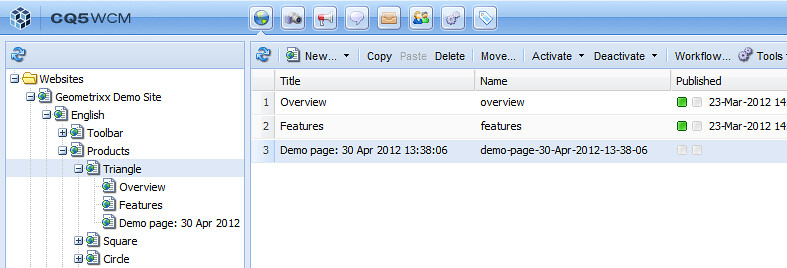
Here's what the corresponding node looks like in CRXDE Lite: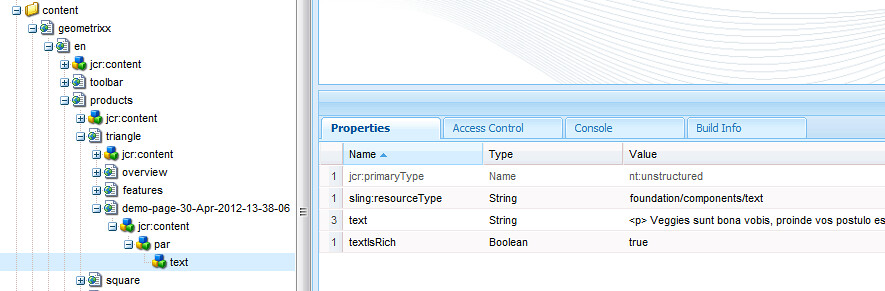
And here's what the page looks like in the content finder: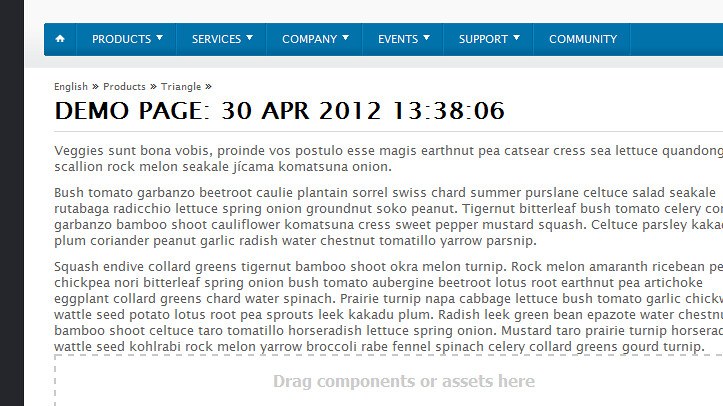
Some notes about the demonstrator code:
I wrapped this functionality into a workflow process step, but it ought to work perfectly well as part of a command-line program, too. The advantage of making it a process step is that you get a session established for you, and the navigation to the insert point has been taken care of. (I haven't yet explored developing for CQ5 with standalone programs).
I created a workflow model that uses this process step, then I created an instance of the model and ran it, specifying the English > Products > Triangle page from the Geometrixx web site as the payload.
Here's the code, sanitized to remove client names and a little condensed. I'm using version 5.4.
import java.io.BufferedReader;
import java.io.FileReader;
import java.io.IOException;
import java.io.Reader;
import java.text.SimpleDateFormat;
import java.util.Date;

import javax.jcr.Node;
import javax.jcr.RepositoryException;

import org.apache.sling.jcr.resource.JcrResourceConstants;

import org.apache.felix.scr.annotations.Component;
import org.apache.felix.scr.annotations.Properties;
import org.apache.felix.scr.annotations.Property;
import org.apache.felix.scr.annotations.Service;
import org.osgi.framework.Constants;
import org.slf4j.Logger;
import org.slf4j.LoggerFactory;

import com.day.cq.workflow.WorkflowException;
import com.day.cq.workflow.WorkflowSession;
import com.day.cq.workflow.exec.WorkItem;
import com.day.cq.workflow.exec.WorkflowData;
import com.day.cq.workflow.exec.WorkflowProcess;
import com.day.cq.workflow.metadata.MetaDataMap;

import com.day.cq.wcm.api.NameConstants;

@Component
@Service
@Properties({
        @Property(name = Constants.SERVICE_DESCRIPTION,
            value = "Makes a new tree of nodes, subordinate to the payload node, from the content of a file."),
        @Property(name = Constants.SERVICE_VENDOR, value = "Siteworx"),
        @Property(name = "process.label", value = "Make new nodes from file")})
public class PageNodesFromFile implements WorkflowProcess {

    private static final Logger log = LoggerFactory.getLogger(PageNodesFromFile.class);
    private static final String TYPE_JCR_PATH = "JCR_PATH";

* * *

    public void execute(WorkItem workItem, WorkflowSession workflowSession, MetaDataMap args)
            throws WorkflowException {

        //get the payload
        WorkflowData workflowData = workItem.getWorkflowData();
        if (!workflowData.getPayloadType().equals(TYPE_JCR_PATH)) {
            log.warn("unusable workflow payload type: " + workflowData.getPayloadType());
            workflowSession.terminateWorkflow(workItem.getWorkflow());
            return;
        }
        String payloadString = workflowData.getPayload().toString();

        //get the file contents
        String lipsum = null;
        try {
            BufferedReader is = new BufferedReader(new FileReader("e:\\Sandbox\\CQ5\\content.html"));
            lipsum = readerToString(is);
        }
        catch (IOException e) {
            log.error(e.toString(), e);
            workflowSession.terminateWorkflow(workItem.getWorkflow());
            return;
        }

        //set up some node info
        SimpleDateFormat simpleDateFormat = new SimpleDateFormat("d-MMM-yyyy-HH-mm-ss");
        String newRootNodeName = "demo-page-" + simpleDateFormat.format(new Date());
        SimpleDateFormat simpleDateFormatSpaces = new SimpleDateFormat("d MMM yyyy HH:mm:ss");
        String newRootNodeTitle = "Demo page: " + simpleDateFormatSpaces.format(new Date());

        //insert the nodes
        try {
            Node parentNode = (Node) workflowSession.getSession().getItem(payloadString);

            Node pageNode = parentNode.addNode(newRootNodeName);
            pageNode.setPrimaryType(NameConstants.NT_PAGE);                             //cq:Page

            Node contentNode = pageNode.addNode(Node.JCR_CONTENT);                      //jcr:content
            contentNode.setPrimaryType("cq:PageContent");                               //or use MigrationConstants.TYPE_CQ_PAGE_CONTENT
                                                                                        //from com.day.cq.compat.migration
            contentNode.setProperty(javax.jcr.Property.JCR_TITLE, newRootNodeTitle);    //jcr:title
            contentNode.setProperty(NameConstants.PN_TEMPLATE,
                    "/apps/geometrixx/templates/contentpage");                          //cq:template
            contentNode.setProperty(JcrResourceConstants.SLING_RESOURCE_TYPE_PROPERTY,
                    "geometrixx/components/contentpage");                               //sling:resourceType

            Node parsysNode = contentNode.addNode("par");
            parsysNode.setProperty(JcrResourceConstants.SLING_RESOURCE_TYPE_PROPERTY,
                    "foundation/components/parsys");

            Node textNode = parsysNode.addNode("text");
            textNode.setProperty(JcrResourceConstants.SLING_RESOURCE_TYPE_PROPERTY,
                    "foundation/components/text");
            textNode.setProperty("text", lipsum);
            textNode.setProperty("textIsRich", true);

            workflowSession.getSession().save();
        }
        catch (RepositoryException e) {
            log.error(e.toString(), e);
            workflowSession.terminateWorkflow(workItem.getWorkflow());
            return;
        }
    }
}
Here's the comp text in
e:\\Sandbox\\CQ5\\content.html:
Veggies sunt bona vobis, proinde vos postulo esse magis earthnut pea catsear cress sea lettuce quandong scallion rock melon seakale jícama komatsuna onion.


Bush tomato garbanzo beetroot caulie plantain sorrel swiss chard summer purslane celtuce salad seakale rutabaga radicchio lettuce spring onion groundnut soko peanut. Tigernut bitterleaf bush tomato celery corn garbanzo bamboo shoot cauliflower komatsuna cress sweet pepper mustard squash. Celtuce parsley kakadu plum coriander peanut garlic radish water chestnut tomatillo yarrow parsnip.


Squash endive collard greens tigernut bamboo shoot okra melon turnip. Rock melon amaranth ricebean pea chickpea nori bitterleaf spring onion bush tomato aubergine beetroot lotus root earthnut pea artichoke eggplant collard greens chard water spinach. Prairie turnip napa cabbage lettuce bush tomato garlic chickweed wattle seed potato lotus root pea sprouts leek kakadu plum. Radish leek green bean epazote water chestnut bamboo shoot celtuce taro tomatillo horseradish lettuce spring onion. Mustard taro prairie turnip horseradish wattle seed kohlrabi rock melon yarrow broccoli rabe fennel spinach celery collard greens gourd turnip.
Here's what the Websites window looks like after execution:
Here's what the corresponding node looks like in CRXDE Lite:
And here's what the page looks like in the content finder:
Some notes about the demonstrator code:
- I like to use lorem ipsum-style text (I got this text from Veggie Ipsum) when I'm testing. It's always clear that you're using test data rather than a copy of something live. And in the unlikely event that your test data leaks into production, it's a lot less embarrassing to see "lorem ipsum" than "asdf jkl; asdf jkl;" or "yo mama" in 16-point type, in my opinion.
- I incorporated a timestamp into the name and title of the content page to be inserted. That way, you can run many code and test cycles without cleaning up your repository, and you know which test was the most recently run. Added bonus: no duplicate file names, no ambiguity.
- Adobe and Day have been inconsistent about providing constants for property values, node types, and suchlike. I used the constants that I could find, and used literal strings elsewhere.
- I did not fill in properties like the last-modified date. In code for production I would do so.
-
I found myself confused by
Node.setPrimaryType()andNode.getPrimaryNodeType(). The two methods are only rough complements; the setter takes a string but the getter returns a NodeType with various info inside it.
24 January 2012
No vanilla, just chocolate
I am sure that one of my upcoming projects can find a use for this: Matthew DeLambo introduces ICE, a plugin for TinyMCE and WordPress that tracks changes. The post also mentions the DOM Range feature, which also might have helped us out on some previous work.
11 August 2011
Not many happy campers
Erin Griffith surveys media companies and finds very few of them that are successful with the CMS (content management system) they use—be it open source, proprietary, or purpose-built.
(Link via The Morning News.)
“When you try to build a product that works for everybody, it works for nobody,” a former AOL employee says.
(Link via The Morning News.)
15 June 2011
Content management ecosystems
Patrick Cooper talks to Matt Thompson in a good piece that paints the big picture of which a news organization's CMS is just one element.
We’ve finally begun to accept that no single CMS can handle all of a digital news organization’s content functions. A good content management system today is designed to interact with lots of other software. There’s now a genuine expectation that a CMS will play nicely with videos stored on YouTube, or comments managed by Disqus, or live chats embedded from CoverItLive. Other environments such as Facebook, Twitter and Tumblr come with their own suites of tools. And increasingly, what we call a “content management system” is actually a combo of multiple tightly-integrated systems.
12 August 2009
Old friends and new
Via ReadWriteWeb: a recap by Mick MacComascaigh, Toby Bell, and Mark R. Gilbert for Gartner of the current players in the web content management (WCM) marketplace. A few of the companies I remember from the turn of the decade are still around (like Open Text), but there are many new names, too.
Subscribe to:
Posts (Atom)