Showing posts with label readme. Show all posts

12 April 2018

A Portable Cosmos

Solving the puzzles posed by a broken, corroded mechanical gizmo found by sponge divers in the waters off a small Greek island might seem, at first thought, unrelated to the problems of debugging a software service or improving the user experience of a new mobile app. But, as Alexander Jones in A Portable Cosmos (Oxford University Press, 2017) recounts the researches into what is now called the Antikythera Mechanism, discovered in 1900 as part of the cargo of a shipwreck, some surprising parallels with current software development practices come into view.

Ever since the bronze fragments of the Mechanism were brought to the surface, archeologists and other technologists have trained increasingly sophisticated tools on it, from detailed drawings, to progressively more detailed photographs, to (from 1988) radiological focal plane tomography (to look inside it, non-destructively), to reflectance transformation imaging (a super-contrast way of reading the inscriptions on the front and back of the device). This is reverse engineering on a millennial scale.

Our current understanding is that the Antikythera Mechanism was made in the first century BCE. About the size of a shoebox standing on end, it housed an intricate assemblage of gears, driven by a hand crank on the side of its enclosure. On what we call the front, a miniature solar system of Moon, Sun, Mercury, Venus, Mars, Jupiter, and Saturn revolved within two bezels marked with the constellations of the Zodiac and the months of the Egyptian calendar. On the back, pointers moving across two spiral dials (and three smaller dials) displayed celestial events in 19- and 76-year cycles. Bronze plates covering the front and back explained its operation and provided additional astronomical information.

So what does sussing out this—let me write it—analog dingus have to do with current technology practice? A few points:

Switching contexts to gain understanding: Or what I might call inference feedback loops. One of the back dials (one of the few that were completely preserved) is inscribed with the names of various athletic events that recur in four-year cycles, from the best-known Olympics to the rather obscure Naa and Halieia games. The Halieia festival took place in Rhodes; Rhodes was the home of the highly influential astronomer Hipparchus; and writings by Cicero refer to a celestial machine made there. Hence, it is likely that the Antikythera Mechanism was built in Rhodes (p. 94). Elsewhere, Jones accumulates information that points to the intended destination of the device: Epirus, in the far west of the Greek peninsula. Thus, we can connect the dots that a wrecked cargo ship traveling between these two points would be found someone between them—off the island of Aigila (also called Antikythera).

Similarly, Jones examines the orientation of the back dials and their pointers (p. 159). An arrangement that puts the pointers at the top pointing straight down and the pointers at the bottom parallel to one another corresponds to a zero point, or calendrical epoch, of 25 August 205 BCE. This date is not too far in the past for a device built in about 60 BCE.

The arithmetic of the gears: Some of the gears are sufficiently intact that we can count the number of teeth; others are just stuck together with 2000 years of gunk. But we can infer the missing gear trains. Since we know the patterns and cycles that each dial pointer would have had to trace, we can calculate the gear ratios necessary to produce the required movement. For instance, to account for a Moon pointer:

The pointer has to revolve 254 times clockwise around the dial in the same time as [main gear] b1 rotates 19 times; hence the desired ratio of periods is 19:254. A gear with 254 teeth would probably have been considered undesirably large... The prime factors of 254 are 2 and 127, so a gear with 127 teeth was unavoidable as the driving gear in an engaged pair. A gear with 19 or a small multiple of 19 will be necessary as a driven gear; since 19 is an uncomfortably small number of teeth for a gear, we can tentatively chose 38 as the smallest viable multiple. If we just had a gear pair with tooth counts 38 and 127, the resulting ratio would be four times what we want, so additional gears must be provided that collectively amount to a ratio of 1:4. (pp. 210-211)

Designed vs. actual use: For twelve decades, various purposes have been proposed for the whatsit. Early researchers reasoned that, since it was on a ship, it was an astrolabe or other navigational device. Later, as more details became available, it became clear that the machine could be used to predict eclipses and compute horoscopes. Jones argues, however, that while the mechanism could do these things, it was much better suited as a portable planetarium—a teaching device. And indeed, a student watching the planets in motion, with their anomalies and retrogrades, would have been much more engaged than the same student studying two-dimensional static diagrams—like the (very well done) diagrams in Jones's book. In today's world, consider the three-dimensional ball-and-stick model of biological molecules like DNA as compared to the same information rendered on paper.

Design for small spaces: The Saros dial on the back is divided into 233 cells. When a pointer points to particular cell, then the positions of Earth, Sun, and Moon are such that a lunar and/or eclipse is likely, and at a certain time. The Mechanism represents these facts with a combination of one-letter initials and two-letter ligatures: 8 characters to compactly represent, say, "Eclipse of the Moon, during hour 5 of the day; Eclipse of the Sun, during hour 12 of the day." An additional letter in the cell indexes to inscriptions on the back face of the machine, describing periodic starry events in greater detail. The index letter is a callout, in other words. (p. 152)

The Antikythera Mechanism is an altogether fascinating contraption, one that still keeps a few secrets to be revealed.

30 April 2012

Fun with CQ5: 1

The code examples provided by Adobe for CQ5 developers are fine so far as they go. But I found myself exploring the territory without a map when I started prototyping code to perform a bulk import (from a legacy CMS, in my case). So I put together this toy class; it inserts a content page and text (as a parsys) at an arbitrary position in the content hierarchy.
I wrapped this functionality into a workflow process step, but it ought to work perfectly well as part of a command-line program, too. The advantage of making it a process step is that you get a session established for you, and the navigation to the insert point has been taken care of. (I haven't yet explored developing for CQ5 with standalone programs).
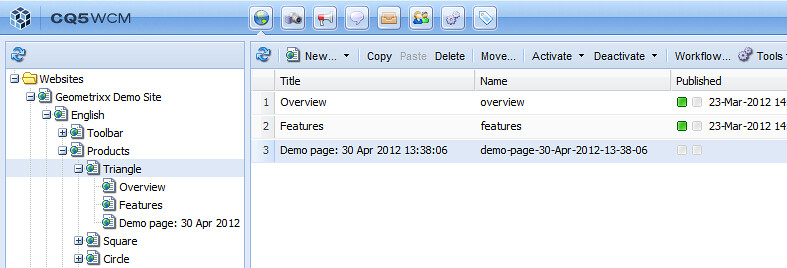
I created a workflow model that uses this process step, then I created an instance of the model and ran it, specifying the English > Products > Triangle page from the Geometrixx web site as the payload.
Here's the code, sanitized to remove client names and a little condensed. I'm using version 5.4.
import java.io.BufferedReader;
import java.io.FileReader;
import java.io.IOException;
import java.io.Reader;
import java.text.SimpleDateFormat;
import java.util.Date;

import javax.jcr.Node;
import javax.jcr.RepositoryException;

import org.apache.sling.jcr.resource.JcrResourceConstants;

import org.apache.felix.scr.annotations.Component;
import org.apache.felix.scr.annotations.Properties;
import org.apache.felix.scr.annotations.Property;
import org.apache.felix.scr.annotations.Service;
import org.osgi.framework.Constants;
import org.slf4j.Logger;
import org.slf4j.LoggerFactory;

import com.day.cq.workflow.WorkflowException;
import com.day.cq.workflow.WorkflowSession;
import com.day.cq.workflow.exec.WorkItem;
import com.day.cq.workflow.exec.WorkflowData;
import com.day.cq.workflow.exec.WorkflowProcess;
import com.day.cq.workflow.metadata.MetaDataMap;

import com.day.cq.wcm.api.NameConstants;

@Component
@Service
@Properties({
        @Property(name = Constants.SERVICE_DESCRIPTION,
            value = "Makes a new tree of nodes, subordinate to the payload node, from the content of a file."),
        @Property(name = Constants.SERVICE_VENDOR, value = "Siteworx"),
        @Property(name = "process.label", value = "Make new nodes from file")})
public class PageNodesFromFile implements WorkflowProcess {

    private static final Logger log = LoggerFactory.getLogger(PageNodesFromFile.class);
    private static final String TYPE_JCR_PATH = "JCR_PATH";
    
* * * 
    
    public void execute(WorkItem workItem, WorkflowSession workflowSession, MetaDataMap args)
            throws WorkflowException {

        //get the payload
        WorkflowData workflowData = workItem.getWorkflowData();
        if (!workflowData.getPayloadType().equals(TYPE_JCR_PATH)) {
            log.warn("unusable workflow payload type: " + workflowData.getPayloadType());
            workflowSession.terminateWorkflow(workItem.getWorkflow());
            return;
        }
        String payloadString = workflowData.getPayload().toString();

        //get the file contents
        String lipsum = null;
        try {
            BufferedReader is = new BufferedReader(new FileReader("e:\\Sandbox\\CQ5\\content.html"));
            lipsum = readerToString(is);
        }
        catch (IOException e) {
            log.error(e.toString(), e);
            workflowSession.terminateWorkflow(workItem.getWorkflow());
            return;
        }
        
        //set up some node info
        SimpleDateFormat simpleDateFormat = new SimpleDateFormat("d-MMM-yyyy-HH-mm-ss");
        String newRootNodeName = "demo-page-" + simpleDateFormat.format(new Date());
        SimpleDateFormat simpleDateFormatSpaces = new SimpleDateFormat("d MMM yyyy HH:mm:ss");
        String newRootNodeTitle = "Demo page: " + simpleDateFormatSpaces.format(new Date());
        
        //insert the nodes
        try {
            Node parentNode = (Node) workflowSession.getSession().getItem(payloadString);
            
            Node pageNode = parentNode.addNode(newRootNodeName);
            pageNode.setPrimaryType(NameConstants.NT_PAGE);                             //cq:Page
            
            Node contentNode = pageNode.addNode(Node.JCR_CONTENT);                      //jcr:content
            contentNode.setPrimaryType("cq:PageContent");                               //or use MigrationConstants.TYPE_CQ_PAGE_CONTENT
                                                                                        //from com.day.cq.compat.migration
            contentNode.setProperty(javax.jcr.Property.JCR_TITLE, newRootNodeTitle);    //jcr:title
            contentNode.setProperty(NameConstants.PN_TEMPLATE,
                    "/apps/geometrixx/templates/contentpage");                          //cq:template
            contentNode.setProperty(JcrResourceConstants.SLING_RESOURCE_TYPE_PROPERTY,
                    "geometrixx/components/contentpage");                               //sling:resourceType
            
            Node parsysNode = contentNode.addNode("par");
            parsysNode.setProperty(JcrResourceConstants.SLING_RESOURCE_TYPE_PROPERTY,
                    "foundation/components/parsys");
            
            Node textNode = parsysNode.addNode("text");
            textNode.setProperty(JcrResourceConstants.SLING_RESOURCE_TYPE_PROPERTY,
                    "foundation/components/text");
            textNode.setProperty("text", lipsum);
            textNode.setProperty("textIsRich", true);
            
            workflowSession.getSession().save();
        }
        catch (RepositoryException e) {
            log.error(e.toString(), e);
            workflowSession.terminateWorkflow(workItem.getWorkflow());
            return;
        }
    }
}

Here's the comp text in e:\\Sandbox\\CQ5\\content.html:
Veggies sunt bona vobis, proinde vos postulo esse magis earthnut pea catsear cress sea lettuce quandong scallion rock melon seakale jícama komatsuna onion.
Bush tomato garbanzo beetroot caulie plantain sorrel swiss chard summer purslane celtuce salad seakale rutabaga radicchio lettuce spring onion groundnut soko peanut. Tigernut bitterleaf bush tomato celery corn garbanzo bamboo shoot cauliflower komatsuna cress sweet pepper mustard squash. Celtuce parsley kakadu plum coriander peanut garlic radish water chestnut tomatillo yarrow parsnip.
Squash endive collard greens tigernut bamboo shoot okra melon turnip. Rock melon amaranth ricebean pea chickpea nori bitterleaf spring onion bush tomato aubergine beetroot lotus root earthnut pea artichoke eggplant collard greens chard water spinach. Prairie turnip napa cabbage lettuce bush tomato garlic chickweed wattle seed potato lotus root pea sprouts leek kakadu plum. Radish leek green bean epazote water chestnut bamboo shoot celtuce taro tomatillo horseradish lettuce spring onion. Mustard taro prairie turnip horseradish wattle seed kohlrabi rock melon yarrow broccoli rabe fennel spinach celery collard greens gourd turnip.
Here's what the Websites window looks like after execution: cq5-demo-websites
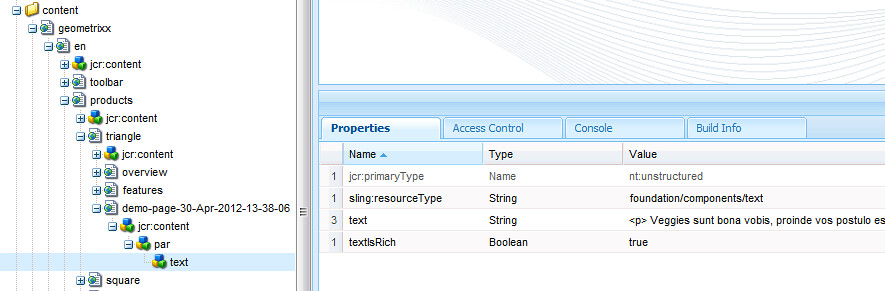
Here's what the corresponding node looks like in CRXDE Lite: cq5-demo-crxde-lite
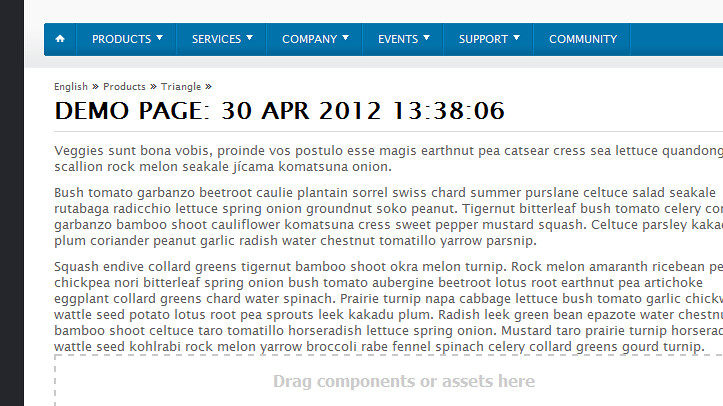
And here's what the page looks like in the content finder: cq5-demo-rendered
Some notes about the demonstrator code:
  • I like to use lorem ipsum-style text (I got this text from Veggie Ipsum) when I'm testing. It's always clear that you're using test data rather than a copy of something live. And in the unlikely event that your test data leaks into production, it's a lot less embarrassing to see "lorem ipsum" than "asdf jkl; asdf jkl;" or "yo mama" in 16-point type, in my opinion.
  • I incorporated a timestamp into the name and title of the content page to be inserted. That way, you can run many code and test cycles without cleaning up your repository, and you know which test was the most recently run. Added bonus: no duplicate file names, no ambiguity.
  • Adobe and Day have been inconsistent about providing constants for property values, node types, and suchlike. I used the constants that I could find, and used literal strings elsewhere.
  • I did not fill in properties like the last-modified date. In code for production I would do so.
  • I found myself confused by Node.setPrimaryType() and Node.getPrimaryNodeType(). The two methods are only rough complements; the setter takes a string but the getter returns a NodeType with various info inside it.

05 November 2011

This week's mystery

I'm building a little interface between my client's CMS and Flickr. The new tool will harvest images that the client (and its photographers on assignment) has posted to Flickr and will incorporate them into the CMS, with editors adding additional metadata subsequent to publication.

First let me say how impressed I am overall with the Flickr API. The services are comprehensive; names of things are consistent and parallel; each service has its own web-based test harness so you can try it out. And the API Just Works.

Now, to get the full-size images originally posted to Flickr, my interface app has to authenticate to Flickr using the OAuth protocol. This is somewhat fiddly code, but Flickr's documentation explains the process flow quite well, and with the help of the Scribe library from Pablo Ferndandez, I had my app working in short order.

Until this past week, that is. A few days ago I was actively working on my app and doing a lot of debugging and banging through the user authorization page. And then, sporadically, instead of the expected "[David's app] wants to link to your Flickr account." the page would display this message: "Oops! Flickr doesn't recognise the "oauth_token" this application is trying to use." Long story short, I tried just about everything, wiggling all the wires that I could, logging out of Flickr, restarting my Tomcat and Apache—and then sometimes the right page would appear and sometimes it wouldn't.

It turns out that other developers are experiencing the same problem. See, for instance, this discussion thread on the Flickr API group, as well as this post to Scribe's support board. No replies from Flickr's tech team as to what's going on. I suspect that Flickr is silently throttling the number of requests to the authorization page. This may not be a problem for my client when this tool goes into production, but it makes it dang hard to code and test.

28 October 2011

two EdsEd the fish, Betta sp., graciously agreed to pose with me and one of the honors the team has received recently, a 2011 Edward R. Murrow Award granted by the Radio Television Digital News Association. The award recognizes NPR.org in the Radio-Network Market for excellence as a Broadcast Affiliated Website.

30 November 2010

Regex mystery, once more

I spent some quality time with Friedl's Mastering Regular Expressions, and I'm beginning to get a better understanding of JavaScript's NFA regular expression engine. I dimly understand how the case I described in an earlier post sent the engine into backtracking perdition. I tested (but did not commit to the codebase) this version. It addresses the specific bad data case, but I don't think it's a comprehensive solution.


var PROBE_REGEX = /client\.org/;
var URL_REGEX = /^(http:\/\/)?(\w+\.?)*client\.org(.*)$/i;

stripUrlPrefix = function (url) {
var regex = new RegExp(URL_REGEX);
var result = jQuery.trim(url);
if (result.search(PROBE_REGEX) == -1) {
return result;
}
var matches = regex.exec(result);
if (matches) {
return matches[3];
} else {
return result;
}
}


It's one or both of the quantified expressions (\w+\.?)* and (.*) that are responsible for the performance issues.

28 January 2010

Fun with jqGrid

We've recently started using jqGrid, a jQuery-based data grid tool, for presenting search results. I picked up a tip for adding a custom caption to the rows-per-page dropdown (which is controlled by the rowlist[] array). Unfortunately, that bit of code is subject to a one-off bug in that it is not idempotent. So when it's used in a loadComplete event handler (which fires each time the grid is [server-side] sorted or otherwise reloaded), I found that I had to write some first-time-only guard logic. Here's an abridged version of my code that sets up the grid, with a few other hacks to work around some deficiencies in jqGrid.


var dataGrid;
var firstTime = true;

jQuery(document).ready(function(){

//set up our own grid wrapper
dataGrid = new CLIENT.DataGrid.DataGrid('#postList');

//set up the main grid
jQuery('#postList').jqGrid({
url: BASE_URL,
datatype: 'xml',
mtype: 'GET',
colNames: ['Status', 'Headline', 'Byline(s)', 'Date'],
colModel: [
{name: 'status', width: 80, sortable: false},
{name: 'headline',width: 290, index: 1},
{name: 'bylines', width: 148, sortable: false},
{name: 'date', width: 150, index: 2},
],
rowList: [10,20,30,50],
pager: '#postPager',
pgbuttons: true,
rowNum: 20,
loadonce: false,
viewrecords: true,
recordtext: 'Posts {0} - {1} of {2}',
pgtext: 'Page {0} of {1}',
emptyrecords: 'No posts to display',
* * *
loadComplete: function () {
jQuery('select[class="ui-pg-selbox"]').attr({title: 'Posts per page'}); //label for rowList-based dropdown
if (firstTime) {
jQuery('#postPager .ui-pg-selbox').closest('td').after('Posts per page');
firstTime = false;
}
jQuery('#postPager_center').attr({style: 'white-space: pre; width: 450px;'}); //override jqGrid's width
jQuery('#jqgh_status').attr({className: 'nosort'}); //sortable: attribute doesn't clear the ui-jqgrid-sortable class for us
jQuery('#jqgh_bylines').attr({className: 'nosort'});
}
});
});

27 August 2009

Eval of jQuery data grid plugins

[Adapted from a wiki entry I made for my current project:]

Starting from a brief review article, I looked at five tools:


Flexigrid and jTPS have very little documentation and have not been updated for nearly a year, and so I did not try to get these tools working. I downloaded jqGrid, Ingrid, and FireScope Grid and assembled test harnesses for all three.

Of these three, all use Ajax to populate the grid. All of them accomplish sorting by an Ajax call back to the server, passing a parm to specify the sort column and direction. So we would accomplish sorting of dates (or any other data types with unusual sort requirements) with server-side logic.

All three tools provide paging navigators, but all require some paging logic to be performed on the server. I didn't fully eval this area, because I used a static file of data to populate the grid.

Ingrid and FireScope Grid only support HTML data. jqGrid, according to its wiki entry, provides these options for its datatype parameter:


  • xml
  • json
  • local or clientSide
  • xmlstring
  • jsonstring
  • script
  • function (…)


I tested the tool with XML, but JSON support would appear to be consistent with other technologies we're using on the project.

jqGrid is not bug-free: in particular, I'm seeing a one-off issue with specifying the number of rows to display, and there are some formatting weirdnesses with the navigation bar. But it is the only tool of the five with a wiki for documentation (albeit the wiki's spelling and grammar are a little wonky), and it is the most fully-featured tool. Indeed, the download page offers a choice of optional components to download.

I will proceed with building out a prototype of the new search results page with jqGrid.

07 October 2008

Geezerbox

entrance I took a long side trip from my family business in the Sacramento area to visit the Computer History Museum in Mountain View, spang in Silicon Valley. The donation-funded museum was relocated a few years ago from digs in Massachusetts.


steampunk calculatordifference engine detailUntil early next year, the highlight of the collection is Difference Engine No. 2, constructed from Charles Babbage's plans for Nathan Myhrvold and on loan to the museum. Like everything else in the museum, this machine is vounteer-powered , one staffer taking a turn at the crank while the other explains the workings. Though the gear is equipped for printing (see detail at right), that part of its operation is not part of the demo, as it takes four hours to clean up every time.


expensive benchMost of the equipment is hands-off, but you can have a seat on this Cray-1, located just outside the main exhibit hall.


Another highlight of the visit is the demonstration of a reconstructed PDP-1, Digital Equipment's first commercial system, docented by John Bohner and Peter Samson when I visited. The PDP-1, introduced in the early 1960s, was the first machine to feature a symbolic debugger, an amenity no doubt appreciated by Samson. As part of the restoration, he reverse-engineered paper-tape music files that had been serendipitously preserved in order to recreate a music synthesizer that he wrote while an undergraduate at MIT. The synthesizer resides in 4K of memory, which is also a good thing, because this model holds all of 12K 18-bit words.

grad school daysfull circleMost all of the other boxes are not powered up, but rather are displayed warehouse-style in the main hall. (Imagine the heat generated by all of these boxes were they all running!) My graduate school days were brought back by the sight of a DECSystem-10 (at left). Those panels of switches are perhaps the only attractive industrial design to come out of the 1970s. And most of us, in one way or another, have crossed paths with an IBM System/360 (at right).


There are lots of smaller, newer, and older items, as well: a rack of HP calculators, Herman Hollerith's tabulation equipment, a rack of tubes from ENIAC, some game consoles, a Sage air-defense system (tube-based and inexplicably still in service through 1983), a Norden bombsight, an Enigma machine.

Except for a side exhibit of computer chess (and the PDP-1 demo), there isn't a lot of emphasis on software; for now, the museum is largely a repository of hardware. But, we hope, forthcoming fundraising will increase the level of interactivity at this gem of a museum.

29 July 2008

Choose Me

We support a number of different question types in our surveys. As a questionnaire designer, you can ask a question that has to be answered with a number, or with a date. Or you can ask for a long free-text answer: EFM Community calls this an "essay question." But the predominant question types are two: Choose One and Choose Many. (Older versions of EFM Feedback called these Single Select and Multiple Select.) These questions can be asked either one-by-one or grouped into tables or matrices. Maybe 80% of the questions asked in deployed surveys are either Choose One or Choose Many.

A Choose One question is usually rendered with radio buttons, though sometimes designers use a dropdown.

What is your favorite color?

Red Orange Yellow Green Blue


While a Choose Many (a/k/a Choose All That Apply) uses checkboxes.

What Metro line(s) do you ride regularly?

Red OrangeYellow Green Blue


These two question types look to be so similar, and yet there are subtle differences in the way the data for them is collected and analyzed, and I've seen more than one analyst stumble over the differences.

Let's say that you're architecting an application that lets people design and administer surveys. What are the pitfalls? Here I'm focusing on how to model the actual survey responses that are collected, rather than how to model the metadata that constitutes the survey design.

A single database attribute is sufficient to store the respondents' answers to a Choose One. For our example question above, assign the values 1 through 5 to the five color choices. Then you can store the survey respondents' answers in a relational database column typed as an integer of some suitable size, 8 or 16 bits, perhaps. It depends on how many possible choices you want to provide for in your survey software app.

On the other hand, for a Choose Many, you need as many database attributes as there are possible choices. One way to do it is to use one boolean database column for each choice: five columns in our example above. Or you could pack the answers into a bitfield, although querying and filtering on individual choices would then be a problem. Whatever path you take as the software architect, the key point is that the respondents' answers will be represented differently than for Choose One questions.

Generally, Choose Ones are just easier to deal with—a generic design is more accommodating. This fact probably explains why almost all of the free online polls that you see (hosted by outfits like polldaddy) are Choose Ones.

If your survey app allows designers to change a survey's design by adding more choices after the survey has been released to the world, you can see that adding a choice to a Choose One (just another possible value to be stored) is a lot simpler than adding a choice to a Choose Many (maybe a new database column).

What is your favorite color?

Red Orange Yellow Green Blue Indigo Violet

What Metro line(s) do you ride regularly?

Red Orange Yellow Green Blue Silver Purple


Even trickier is enabling a survey designer to rewrite a Choose One as a Choose Many, or vice versa.

What are your favorite color(s)?

Red Orange Yellow Green Blue

What Metro line do you ride most often?

Red Orange Yellow Green Blue


In this case, you're not simply extending a relational schema by adding columns or possible values, but rather you've got to convert one column type to another.

Reporting and analyzing survey responses for the two question types is likewise different.

For Choose One questions, you can do a frequency analysis that adds up to 100%:

What is your favorite color? (N of respondents=100)

  • 45% Red
  • 12% Orange
  • 10% Yellow
  • 17% Green
  • 16% Blue


And if your corresponding numerical scale makes sense, you can compute means and other statistics. (Granted, this makes more sense for computing something like average customer satisfaction than for computing an average favorite color.) Analysis like this can be presented effectively with a pie chart.

But for Choose Many questions, the numbers never add up.

What Metro line(s) do you ride regularly? (N of respondents=100)

  • 45% Red
  • 22% Orange
  • 65% Yellow
  • 22% Green
  • 40% Blue


An unstacked bar chart is probably the best way to present this information graphically. At least you can depend on the longest/tallest bar being no more than 100%. Also notice that you don't have a numerical scale, just booleans, so you can't compute means and standard deviations for Choose Many questions.

I haven't delved into some of the more fiddly bits of designing a survey app that supports Choose One and Choose Many questions. Things like support for "none of the above," "I don't know," "not applicable to me," or "I'd rather not say" choices, or requiring that the respondent check at least one box or radio button, or at most three checkboxes.

06 May 2008

Fun with 88's: Part 3

Continuing my series of posts on tips and tricks with COBOL named conditions (part 1, part 2), let's look at the REDEFINES keyword, which works like a struct, and the OCCURS keyword, which defines an array.

Let's say that requirements for our toy name and address processing application have changed again, and that Canadian addresses and post codes must be supported. We'll put a record type indicator in the unused space at the end of the card, and lay out the city-state-zip storage differently depending on the record type. Remember how we left some space in the level numbers for maintenance? Here's a case where the practice comes in handy:


01 CARD-IMAGE.
03 CARD-NAME-AND-ADDRESS.
05 CARD-NAME.
07 CARD-FIRST-NAME PIC X(10).
07 CARD-LAST-NAME PIC X(10).
05 FILLER PIC X(3).
05 CARD-ADDRESS.
07 CARD-ADDRESS-LINE-1 PIC X(15).
07 CARD-ADDRESS-LINE-2 PIC X(15).
06 CARD-USA-AREA.
07 CARD-CITY PIC X(10).
07 CARD-STATE PIC X(2).
88 CARD-IS-DISTRICT VALUE "DC".
88 CARD-IS-COMMONWEALTH VALUE "PA", "KY", "VA", "MA".
07 FILLER PIC X(8).
07 CARD-ZIP-CODE PIC 9(5).
06 CARD-CANADA-AREA.
REDEFINES CARD-USA-AREA.
07 FILLER PIC X(10).
07 CARD-PROVINCE PIC X(2).
07 FILLER PIC X(6).
07 CARD-POST-CODE PIC X(7).
03 CARD-RECORD-TYPE PIC X(2).
88 CARD-IS-USA VALUE "US".
88 CARD-IS-CANADA VALUE "CA".


Granted, there is opportunity for the record type indicator to disagree with the way the storage is used: object-oriented languages do have something to offer here.

We don't have to provide a separate name for the city part of CARD-CANADA-AREA: we can use CARD-CITY to refer to characters 54 through 63, irrespective of record type.

Now, let's say that we want to print the city and state part of the card image, separated by a comma, with the trailing whitespace squeezed out, for example, "New York, NY". (The STRING statement can also be used to do this, but that's a post for another day.) We can use OCCURS to treat the characters of CARD-CITY as an array (1-based) of 10 characters, and similarly for CARD-STATE.


* * *
07 CARD-CITY.
09 CARD-CITY-CHAR PIC X(1)
OCCURS 10 TIMES.
88 CARD-CITY-CHAR-IS-SPACE
VALUE " ".
07 CARD-STATE.
88 CARD-IS-DISTRICT VALUE "DC".
88 CARD-IS-COMMONWEALTH VALUE "PA", "KY", "VA", "MA".
09 CARD-STATE-CHAR PIC X(1)
OCCURS 2 TIMES.


TIMES is another noise word that usually isn't coded. We'll need an output area and a couple of indexes:


01 OUTPUT-STRING.
03 OUTPUT-CHAR PIC X(1)
OCCURS 13.
01 IEND PIC S9(4) USAGE COMP.
01 IFROM PIC S9(4) USAGE COMP.
01 ITO PIC S9(4) USAGE COMP.


Now we're ready to write some procedural logic. PERFORM... VARYING makes a counted for loop. MOVE is the workhorse assignment statement: notice that the "left hand side" is actually coded on the right.


PROCEDURE DIVISION.
* * *
* Initialize result and its indexer
MOVE SPACES TO OUTPUT-STRING
MOVE ZERO TO ITO
* Scan from the end of the city area until
* a nonspace character is found
PERFORM VARYING IEND FROM 10 BY -1
UNTIL IEND < 1
OR NOT CARD-CITY-CHAR-IS-SPACE(IEND)

CONTINUE
END-PERFORM

* [Some exception-handling logic for the case
* in which the city portion is completely blank
* could be written here.]

* Copy the city, one character at a time, to the output
PERFORM VARYING IFROM FROM 1 BY 1
UNTIL IFROM > IEND

ADD 1 TO ITO
MOVE CARD-CITY-CHAR(IFROM) TO OUTPUT-CHAR(ITO)
END-PERFORM
* Copy the comma
ADD 1 TO ITO
MOVE "," TO OUTPUT-CHAR(ITO)
* Copy the state
PERFORM VARYING IFROM BY 1 BY 1
UNTIL IFROM > 2

ADD 1 TO ITO
MOVE CARD-STATE-CHAR(IFROM) TO OUTPUT-CHAR(ITO)
END-PERFORM


There's all sorts of things we could do to improve and simplify this logic. One change would be to add code to the WORKING-STORAGE SECTION to define the entire card image as an array of 80 characters. It's common that more experienced COBOL programmers write proportionally more code in the DATA DIVISION than they do in the PROCEDURE DIVISION.

A warning, once again: all of the above code is from memory, and hasn't been subjected to compilation or testing. In particular, I don't remember for certain whether 88's can be applied to group-level items as I did above with CARD-STATE.

11 April 2007

Software Tools

Shortly after I started working for Gary at Lupfer & Long, Peter lent me a copy of Software Tools, by Brian W. Kernighan and P.J. Plauger. Published in 1976, the book remains a classic text: beginning with programming in the small, the authors work up to the implementation of an automatic programming language translator—all in the span of fewer than 350 pages. Along the way, they illustrate the philosophy of the Unix operating system from the viewpoint of the applications programmer.

Granted, today's readers may find some of the material quaint, and be baffled by the absence of object-oriented concepts. The book was written at a time when structured programming and top-down design were key concepts of the curriculum, when programmers had to be cautioned against goto statements. (Dijkstra's seminal letter had been published only eight years before; it wasn't until decades later that the industry solved the goto-problem by devising widely-accepted languages that lacked the statement.) The book's power is that it accomplishes so much with nothing more than simple data structures, good algorithm design, and careful separation of function.

Kernighan and Plauger use a vendor-neutral language dubbed Ratfor (short for Rational Fortran) for their code examples. Influenced by the then-new language C (p. 318), Ratfor is a cleaned-up version of the various Fortran dialects of the era. In its lack of line-ending punctuation, it bears a slight resemblance to Python. Here is the word-counting program from page 15 (extracted from the source code, still online, astonishingly):


# wordcount - count words in standard input
character getc
character c
integer inword, wc

wc = 0
inword = NO
while (getc(c) ¬= EOF)
if (c == BLANK | c == NEWLINE | c == TAB)
inword = NO
else if (inword == NO) {
inword = YES
wc = wc + 1
}
call putdec(wc, 1)
call putc(NEWLINE)
stop
end


The book introduces the concept of programs as filters—again, something familiar to us but rather revolutionary at the time—very early, in Chapter 2, with examples like entab, which replaces strings of blanks with tab characters; translit; and crypt; as well as other analogues of Unix command shell utilities. The shell syntax for a pipeline caps off this chapter. And from there, the material ramifies. The full table of contents:

  • Preface
  • Introduction
  • 1. Getting Started
  • 2. Filters
  • 3. Files
  • 4. Sorting
  • 5. Text Patterns
  • 6. Editing
  • 7. Formatting
  • 8. Macro Processing
  • 9. A Ratfor-Fortran Translator
  • Epilogue
  • Appendix: Primitives and Symbolic Constants
  • Index of First Lines
  • Index


Those of us who subscribe to the "Code is Poetry" philosophy appreciate the felicitously-named "Index of First Lines." In this case, since the first line of every program is a comment describing its function, the index is a synopsis of all the code in the book.

For modern audiences, the book functions not so much as a general reference as it does as a guide to thinking about how to approach a programming project. (And yet, for those of us today who rely on class libraries to do our sorting for us, Chapter 4, with its functioning implementations of Bubble Sort, Shell Sort, and Quicksort, may be the only sorting reference we ever need.) Everything is explained in a clear, simple, no-hype style, one that infuses the several titles that Kernighan has co-authored. Here's an example from very early in the book (pp. 14-15), dealing with the chewy problem of static analysis and testing:


How should we test linecount to make sure it really works? When bugs occur, they usually arise at the "boundaries" or extremes of program operation. These are the "exceptions that prove the rule." Here the boundaries are fairly simple: a file with no lines and a file with one line. If the code handles these cases correctly, and the general case of a file with more than one line, it is probable that it will handle all inputs properly.

So we feed linecount an empty file. The while test fails the first time and the body is never obeyed. No lines are counted when none are input. Fine.

If we feed linecount one line, the while is satisfied for every character on the line; the if is satisfied when the NEWLINE is seen, and the line is counted. Then the test is repeated and the while loop exits. Again fine.

A multi-line file. Same behavior as for one line, only now we observe that after each line, the program ends up at the test part of the while—the proper place to begin handling the next line, or EOF. The program checks out.

This may seem like excruciating detail for such a simple program, but it's not. There are common coding blunders which could have caused any one of those three tests to fail, sometimes even while the other two tests succeed. You should learn to think of boundary tests as you code each piece of a program—try them mentally as you write and then physically on the finished product. In practice, the tests go much quicker than we can talk about them and cost but a little additional effort. It is effort that is well repaid.


The intended audience for this book was originally undergraduates taking a second course in CS, but anyone who has moved beyond Logo or Excel macros would benefit from the book, at least its early chapters. And all of us can use a gentle reminder about boundary conditions.

The volume is put together without distracting book designer tricks to pad out the page count: goofy icons, space-wasting figures. It's nothing but text and code, with exercises and bibliographic notes at the end of each chapter. It probably helps that the authors set the text themselves using a PDP-11/45-driven phototypesetter.

A version of this book with Pascal as the coding language appeared in 1981. The newer book perhaps makes it easier to get up and running with the code examples, but it lacks that nifty Ratfor translator. If you've ever thought that it would be cool to build TECO from scratch, pick up a copy of this book.