Showing posts with label professional development. Show all posts
Showing posts with label professional development. Show all posts
22 January 2023
End of the sprint
Friday I retired, after eight great years at NPR. According to Matt Welsh, not a moment too soon. I hope I haven't left any howlers like this one behind, although the clunky JavaScript-only file browser that I built as my first project for NPR has resisted refactoring for 14 years.

12 September 2022
28 November 2021
Glide path
Certainly the next stage in my professional development: recently, doing some hard drive housekeeping, I moved my professional résumé into an /Archives folder. Not gonna need it anymore.
And, thank Fox, I haven't had a bid résumé for consulting work in seven years. Bid résumés sit somewhere on the lies-damn lies-statistics continuum.
08 October 2021
Fail fast, because you will
A perspective on this week's Facebook outage from Remy Porter. It's your job to eff up. Are you rolling out new technology and techniques? Ask
- How does it tell me when I've effed up?
- When I inevitably eff up, how hard is it to fix it?
- How does it minimize the consequences of my eff up?
18 April 2020
07 July 2018
Your (bullet) journal should not look perfect
I find myself bemused by the phenomenon of bullet journals. There are some aspects to this approach to planning that I can get behind—use the system as a motivator, express your creativity, just jump in and do it— but nevertheless, bullet journaling seems to me to be more about making the journal, and making it pretty, than it is about getting things done.
I've been using a pre-printed planner for years (I got hooked when a former employer provided them as regular office supplies), and I've learned a few things.
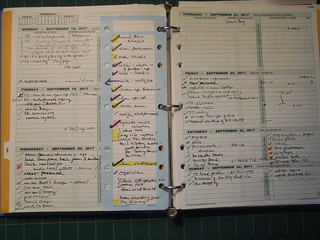
A good journal/planner should look a little messy, maybe a lot.
Nearly printed boxes for days and hours shorten the time to set up my planner for the coming month (it takes me about five minutes), but I still need to do some customizing. Specifically, I need more space for to-dos on the weekends than Day-Timers provides. And tasks will spill out of the neat little boxes, as new information trickles in and new obligations come up.
And that's a good thing. If your week is too tidy, with everything cleanly ticked off, you're not planning to accomplish enough. Whereas in my case, there's almost always too much to do in a week. The wall of to-dos on Saturday is telling me that I'm overcommitted and need to start saying no to things.
Heck, I started making the notes for this blog post last September, and am just now getting something down in digital ink.
Do not hold up looking for the perfect writing instrument to update your planner. Pick up whatever you have on the desk on in your pocket and scribble away. Now, I have started experimenting with color and highlighters to flag important tasks that I've been procrastinating about. But there's no system to my colors—I just grab the first highlighter on my desk that hasn't dried out. (I came by a box of half-used office supplies that I've been using up, but that's a story for a different day.) And if you've got a big, gnarly project that you've just finished, one that's been hanging over your head for a while, go grab a Sharpie and give yourself a plus-size checkmark.
I use my paper planner for the tactical job of getting through the day, getting through the week.
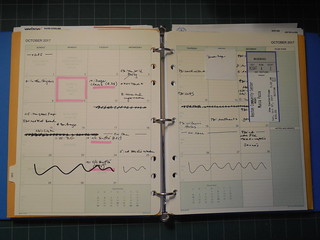
And I have a paper two-page calendar for the month that likewise tells me whether I've got too much planned for the month—or whether I'm going to have a schedule conflict. Sometimes I'll tape a souvenir to the month calendar. Sticky notes help manage a tentative date that I might need to reschedule.
For longer term planning, I made the transition to digital tools some time ago. Transitions plural: I'm now dependent on Trello, with some help from Toodledo for keeping track of recurring tasks.
Actually, when you read to the end of many of the posts about bullet journals, the pragmatic advice comes through: Do what works for you; don't overthink it; all you need is a notebook and a pen to get started.
20 December 2012
Fun with CQ5: 3
My manager referred me to a couple of posts on Jörg Hoh's blog of tips and tricks for CQ5. And from there I learned that Adobe offers two certification courses in CQ5.5. It's always nice to have a new certification to add to your resume. But I should probably wait to sit for the Component Developer exam until I finish the new project I'm starting in January, because my experience to this point has been with 5.4.
01 July 2012
Show your stuff
A good piece by Eilene Zimmerman about services for displaying an online portfolio. As she notes, the idea works just as well for professions not generally considered to be "creative," like accounting or law.
I've been using Visual CV for some time now as my online shop window. I've never gotten a lead from it, as far as I know, but it's nice to have it there as a place that is completely focused on my professional work. There's more flexibility with links (I'm looking at you, LinkedIn), and with a little tweaking, you can use it to display code samples.
30 March 2012
Enfranchised
I've started chipping a little content into Stack Overflow, and have accumulated sufficient reputation points that I can upvote answers. There's a lot of work that could be done in the tag wiki—that could keep me busy.
05 November 2008
Exam prep: 7
Well, there's been lots of excitement these past few weeks, in and out of the office, but I'm trying to keep my feet moving in my studies for the MCTS exam 70-536. This week I started chapter 8 of the standard prep guide: application domains and services.
22 August 2008
05 August 2008
Exam prep: 6
Microsoft has reopened the window for its Second Shot program. This time around, there's no limit on the number of exams you can take.
25 June 2008
Exam (re)prep: 5
So, the short answer is that I did not pass the certification exam that I sat a couple of weeks ago. As far as I can tell, I scored acceptably high on the web section, did okay on the foundation material, but I tanked on the analysis and design section (70-547).
I'm going to pass up the free-retake offer, which expires at the end of this month. I just don't have time to prep that much material. Rather, I'm going to take the three exams separately--probably 70-528 first, in August, and 70-536 in September. Those two together are good for the MCTS credential, and then we'll see about advancing to the MCPD.
I gave a presentation to my development workgroup (about 16 guys) about my current experiences and generally about how the program works. I was a little surprised that more than a couple guys were interested enough to ask questions.
I'm going to pass up the free-retake offer, which expires at the end of this month. I just don't have time to prep that much material. Rather, I'm going to take the three exams separately--probably 70-528 first, in August, and 70-536 in September. Those two together are good for the MCTS credential, and then we'll see about advancing to the MCPD.
I gave a presentation to my development workgroup (about 16 guys) about my current experiences and generally about how the program works. I was a little surprised that more than a couple guys were interested enough to ask questions.
27 May 2008
Exam prep: 4
So I've finished my read-through of the Microsoft training material, and I have my exam scheduled for Friday, so that I can take advantage of the Second Shot program. A 4-hour exam, and material I've been trying to absorb for several months: I'm pretty sure that I will need to exercise my free retest option.
01 May 2008
Exam prep: 3
I've completed my read-thru of the training material for MCTS 70-528. I still have all the security and crypto material from MCTS 70-536 to read. I'm planning to schedule the exam for the end of this month. Pass or fail, I'm doing a 5-minute presentation at an upcoming monthly group meeting on the Microsoft certification process.
07 March 2008
Exam prep: 2
So I've finished my first read-through of the training book for MCPD 70-547. I'm making progress a little more slowly than I'd like, as my notes indicate that I started on January 17. Here's hoping that I can get through MCTS 70-528 and what I have left to read in MCTS 70-536 more quickly: I'd really like to sit for the exam by the end of the second quarter. And I'd like to free up those slots in my Safari subscription.
29 December 2007
Exam prep: 1
I'm taking the opprtunity of the holiday slack time to restart my exam preparation for certification as an MCPD: Windows Developer. I currently hold an MCAD, so I need take only one exam to bump up to the next cert. I had been studying in August and September, but I let myself get distracted, so it's almost like I'm starting over. I've set myself a new goal of passing exam 70-552 by April 30.
I'm reading selected chapters of Jeffery Richter's CLR via C#, largely for background and a refresher on concepts like boxing and unboxing. The heavy-lifting prep is working through Microsoft's self-paced training books MCTS 70-536, MCTS 70-526, and MCPD 70-548. Fortunately, all of these are available through Safari, albeit at two slots a piece. I'm not looking forward to the long units on crypto and security, because, try as I might, it's an area I find it hard to get excited about.
I'm reading selected chapters of Jeffery Richter's CLR via C#, largely for background and a refresher on concepts like boxing and unboxing. The heavy-lifting prep is working through Microsoft's self-paced training books MCTS 70-536, MCTS 70-526, and MCPD 70-548. Fortunately, all of these are available through Safari, albeit at two slots a piece. I'm not looking forward to the long units on crypto and security, because, try as I might, it's an area I find it hard to get excited about.
27 July 2007
Scaffolding
I've been trying to implement some of the ideas in Steve Pavlina's scaffolding exercise, which is designed to improve personal productivity. At present, my workflow at work is such that I'm not frantic with getting everything done; rather, I'm trying the exercise out on my personal life. That said, Pavlina's technique is really tuned for on-the-job productivity enhancement.
(Link via Lifehacker.)
A personal productivity scaffold is like wearing braces. It's a way to redirect your time and energy back onto the "straight" course and away from the crooked one. Once you've set it up, it's fairly easy to maintain, although you may still regard it as a small sacrifice.
Perhaps the most important function your scaffolding must perform is keeping your attention focused on what you want and off of what you don’t want.
(Link via Lifehacker.)
Subscribe to:
Posts (Atom)